Hello Talent,
Casting Networks: Please use the self-tape instructions link written in BLUE, not the script link.
Important Deadlines:
All self-tapes are due 24 hours before the Casting Networks due date.
If you cannot audition, please decline the audition on Casting Networks within 24 hours of receiving your audition email and send an email to Rockcliffes Talent indicating the reason for the decline.
Confirming Your Audition:
Log in to Casting Networks.
Click “Confirm” on the audition page to accept the request within 24 hours of receiving the request.
Submitting Your Self-Tape:
Click “Respond to Request” at the bottom of the audition email.
You may see an error message (404 Homepage). If so, click on it and proceed to your account.
If you do not have an account, select “Create a new account” and choose the free account option.
Once logged in:
Click the three lines at the top → Alerts → select the audition.
Confirm your audition.
The page will then allow you to upload your self-tape under “Upload Video.”
I will review your self-tape and either submit it on your behalf or request a re-tape if necessary.
Thank you for your professionalism and timely submission. PLEASE SEND AN EMAIL INDICATING YOU HAVE SUBMITTED YOUR AUDITION. CASTING NETWORKS IS THE ONLY PLATFORM THAT DOES NOT NOTIFY AGENTS WHEN AN AUDITION HAS BEEN SUBMITTED.
Key Note:
FILM:
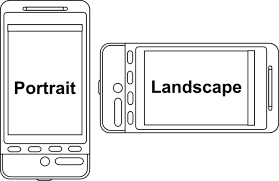
o Orientation: FILM in LANDSCAPE mode, not portrait.
o Background: Use a plain, uncluttered background—no furniture, clothing, or items that could distract the viewer.
o Lighting: Use a ring light of 21” or larger if possible. Lighting is critical—ensure you are well-lit from the front, not from behind.
o Shadows: To avoid shadows on the background, stand at least 2 feet away from the wall or backdrop.
o Framing: Frame from the rib cage up, leaving no more than 2” above the head, unless otherwise specified in the self-tape instructions.
o Noise: Ensure the environment is quiet and free of background noise.
Tip: Proper lighting and clean framing can make a significant difference in landing a callback with the director.
WARDROBE: no buzzing patterns, busy stripes, white or neon colours or logos. Do not wear the same colour as your background.
CAMERA ANGLES
o Straight-On Shots: Film straight on with the camera or phone at eye level—not from above or below.
o Profile Shots: Position yourself at a 45-degree angle (left or right) relative to the camera. Do not turn to a full 90-degree profile during your acting.
o Eye Line: Do not look directly into the camera during the acting portion unless specifically instructed. If you’re looking at a phone or computer, cheat your eyeline outward so the camera can capture your eyes and expressions.
o Slate: You may look directly into the camera only during your slate.
Tip: The director needs to see your eyes and facial expressions clearly—this is key for a strong self-tape.
SLATE:
o Your slate should read:
“Hi, I am (Name) with Rockcliffes Talent for the role of (Name of the Role),”
followed by any additional info requested in the casting instructions.
o Only look directly into the camera during the slate.
Embed your name and agency into the video. Refer to the BE IN THE KNOW under the resource tab regarding this point and many other important learning points to increase your chances of landing a callback and/or role.
ROCKCLIFFES TALENT